
Gogs是一个开箱即用的能够提供网页界面的Git服务,美观简洁,类似GitHub。支持常见的数据库,并且内置SQLite3数据库。官网提供多种版本的gogs
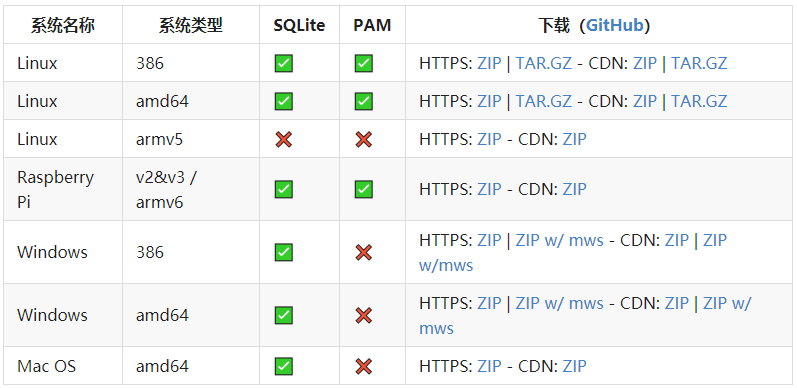
环境需求很简单,只需要安装git就可以
在树莓派上试验安装
在gogs下载树莓派版本,解压后放在任意路径,一般会有这些文件
- custom/ 存放配置文件,删除后,会重新安装gogs,重新配置
- gogs 主程序,使用 gogs web 开启服务
- log/ 默认存放log的地方,可在配置文件中修改
- README.md
- scripts/ 一些写好的脚本模板
- data/ sqlite3数据库的存放位置(最好和gogs主程序在一起,在配置文件中修改后可能会导致git库读写失败)
- LICENSE
- public/
- README_ZH.md
- templates/
修改service文件,假设gogs文件夹放到了~/1209lab/
1
2
3
4
5
6
7
8
9
10
11
12
13
14
15
16
17
18
19
20
21
22
23
24
25
26
27
28
29
[Unit]
Description=Gogs
After=syslog.target
After=network.target
[Service]
# Modify these two values and uncomment them if you have
# repos with lots of files and get an HTTP error 500 because
# of that
###
#LimitMEMLOCK=infinity
#LimitNOFILE=65535
Type=simple
User=pi
Group=pi
WorkingDirectory=/home/pi/1209lab/gogs
ExecStart=/home/pi/1209lab/gogs/gogs web
Restart=always
Environment=USER=pi HOME=/home/pi
# Some distributions may not support these hardening directives. If you cannot start the service due
# to an unknown option, comment out the ones not supported by your version of systemd.
ProtectSystem=full
PrivateDevices=yes
PrivateTmp=yes
NoNewPrivileges=true
[Install]
WantedBy=multi-user.target放到 /lib/systemd/system 下,用下面的代码设置开机启动
1
2
systemctl enable gogs.service
systemctl start gogs.service修改配置文件
1
2
3
4
5
6
7
8
9
10
11
12
13
14
15
16
17
18
19
20
21
22
23
24
25
26
27
28
29
30
31
32
33
34
35
36
37
38
39
40
41
42
43
44
45
46
47
48
49
50
APP_NAME = Gogs
RUN_USER = pi
RUN_MODE = prod
[database]
DB_TYPE = sqlite3
HOST = 127.0.0.1:3306
NAME = gogs
USER = root
PASSWD =
SSL_MODE = disable
PATH = data/gogs.db
[repository]
ROOT = /home/pi/1209lab/gogs-repositories
[server]
DOMAIN = 192.168.1.100
HTTP_PORT = 3000
ROOT_URL = http://192.168.1.100:3000/
DISABLE_SSH = false
SSH_PORT = 22
START_SSH_SERVER = false
OFFLINE_MODE = false
[mailer]
ENABLED = false
[service]
REGISTER_EMAIL_CONFIRM = false
ENABLE_NOTIFY_MAIL = false
DISABLE_REGISTRATION = false
ENABLE_CAPTCHA = true
REQUIRE_SIGNIN_VIEW = false
[picture]
DISABLE_GRAVATAR = false
ENABLE_FEDERATED_AVATAR = false
[session]
PROVIDER = file
[log]
MODE = file
LEVEL = Info
ROOT_PATH = /home/pi/1209lab/gogs-log
[security]
INSTALL_LOCK = true
SECRET_KEY = ivvPmazKANJYz41基本可以运行了
issue
在pull或push时出现 http 401 Unauthorized 错误,解决办法,在git config文件修改,在url中加上user:password
1 | [remote "1209lab"] |