micro_httpd微型Web服务器学习

已经建过好多网站了,可是还不太清楚网页服务器的原理,百度发现了一个微型的服务器micro_httpd,然后就进行了一天的探究。代码不长,就一个C文件,300来行。使用了inetd守护进程提供服务,inetd是Linux下的一个超级守护进程,负责管理很多网络相关的服务,它会监听网络请求,然后再将请求交给它管理的对应的服务去处理。所以micro_httpd只能在linux系统中运行。跟随micro_httpd.c的还有一个makefile文件,编译过程很简单,只要make一下就会生成可执行程序。首先把所有代码贴上来:

程序源代码

1
2
3
4
5
6
7
8
9
10
11
12
13
14
15
16
17
18
19
20
21
22
23
24
25
26
27
28
29
30
31
32
33
34
35
36
37
38
39
40
41
42
43
44
45
46
47
48
49
50
51
52
53
54
55
56
57
58
59
60
61
62
63
64
65
66
67
68
69
70
71
72
73
74
75
76
77
78
79
80
81
82
83
84
85
86
87
88
89
90
91
92
93
94
95
96
97
98
99
100
101
102
103
104
105
106
107
108
109
110
111
112
113
114
115
116
117
118
119
120
121
122
123
124
125
126
127
128
129
130
131
132
133
134
135
136
137
138
139
140
141
142
143
144
145
146
147
148
149
150
151
152
153
154
155
156
157
158
159
160
161
162
163
164
165
166
167
168
169
170
171
172
173
174
175
176
177
178
179
180
181
182
183
184
185
186
187
188
189
190
191
192
193
194
195
196
197
198
199
200
201
202
203
204
205
206
207
208
209
210
211
212
213
214
215
216
217
218
219
220
221
222
223
224
225
226
227
228
229
230
231
232
233
234
235
236
237
238
239
240
241
242
243
244
245
246
247
248
249
250
251
252
253
254
255
256
257
258
259
260
261
262
263
264
265
266
267
268
269
270
271
272
273
274
275
276
277
278
279
280
281
#include <stdlib.h>
#include <unistd.h>
#include <stdio.h>
#include <string.h>
#include <dirent.h>
#include <ctype.h>
#include <time.h>
#include <sys/types.h>
#include <sys/stat.h>

#define SERVER_NAME "micro_httpd"
#define SERVER_URL "http://www.acme.com/software/micro_httpd/"
#define PROTOCOL "HTTP/1.0"
#define RFC1123FMT "%a, %d %b %Y %H:%M:%S GMT"

/* Forwards. */
static void file_details(char *dir, char *name);
static void send_error(int status, char *title, char *extra_header, char *text);
static void send_headers(int status, char *title, char *extra_header, char *mime_type, off_t length, time_t mod);
static char *get_mime_type(char *name);
static void strdecode(char *to, char *from);
static int hexit(char c);
static void strencode(char *to, size_t tosize, const char *from);

int main(int argc, char **argv)
{
char line[10000], method[10000], path[10000], protocol[10000], idx[20000], location[20000];
char *file;
size_t len;
int ich;
struct stat sb;
FILE *fp;
struct dirent **dl;
int i, n;

if (argc != 2)
send_error(500, "Internal Error", (char *)0, "Config error - no dir specified.");
if (chdir(argv[1]) < 0)
send_error(500, "Internal Error", (char *)0, "Config error - couldn't chdir().");
if (fgets(line, sizeof(line), stdin) == (char *)0)
send_error(400, "Bad Request", (char *)0, "No request found.");
if (sscanf(line, "%[^ ] %[^ ] %[^ ]", method, path, protocol) != 3)
send_error(400, "Bad Request", (char *)0, "Can't parse request.");
while (fgets(line, sizeof(line), stdin) != (char *)0)
{
if (strcmp(line, "\n") == 0 || strcmp(line, "\r\n") == 0)
break;
}
if (strcasecmp(method, "get") != 0)
send_error(501, "Not Implemented", (char *)0, "That method is not implemented.");
if (path[0] != '/')
send_error(400, "Bad Request", (char *)0, "Bad filename.");
file = &(path[1]);
strdecode(file, file);
if (file[0] == '\0')
file = "./";
len = strlen(file);
if (file[0] == '/' || strcmp(file, "..") == 0 || strncmp(file, "../", 3) == 0 || strstr(file, "/../") != (char *)0 || strcmp(&(file[len - 3]), "/..") == 0)
send_error(400, "Bad Request", (char *)0, "Illegal filename.");
if (stat(file, &sb) < 0)
send_error(404, "Not Found", (char *)0, "File not found.");
if (S_ISDIR(sb.st_mode))
{
if (file[len - 1] != '/')
{
(void)snprintf(
location, sizeof(location), "Location: %s/", path);
send_error(302, "Found", location, "Directories must end with a slash.");
}
(void)snprintf(idx, sizeof(idx), "%sindex.html", file);
if (stat(idx, &sb) >= 0)
{
file = idx;
goto do_file;
}
send_headers(200, "Ok", (char *)0, "text/html", -1, sb.st_mtime);
(void)printf("\
<!DOCTYPE html PUBLIC \"-//W3C//DTD HTML 4.01 Transitional//EN\" \"http://www.w3.org/TR/html4/loose.dtd\">\n\
<html>\n\
<head>\n\
<meta http-equiv=\"Content-type\" content=\"text/html;charset=UTF-8\">\n\
<title>Index of %s</title>\n\
</head>\n\
<body bgcolor=\"#99cc99\">\n\
<h4>Index of %s</h4>\n\
<pre>\n",
file, file);
n = scandir(file, &dl, NULL, alphasort);
if (n < 0)
perror("scandir");
else
for (i = 0; i < n; ++i)
file_details(file, dl[i]->d_name);
(void)printf("\
</pre>\n\
<hr>\n\
<address><a href=\"%s\">%s</a></address>\n\
</body>\n\
</html>\n",
SERVER_URL, SERVER_NAME);
}
else
{
do_file:
fp = fopen(file, "r");
if (fp == (FILE *)0)
send_error(403, "Forbidden", (char *)0, "File is protected.");
send_headers(200, "Ok", (char *)0, get_mime_type(file), sb.st_size, sb.st_mtime);
while ((ich = getc(fp)) != EOF)
putchar(ich);
}

(void)fflush(stdout);
exit(0);
}

static void
file_details(char *dir, char *name)
{
static char encoded_name[1000];
static char path[2000];
struct stat sb;
char timestr[16];

strencode(encoded_name, sizeof(encoded_name), name);
(void)snprintf(path, sizeof(path), "%s/%s", dir, name);
if (lstat(path, &sb) < 0)
(void)printf("<a href=\"%s\">%-32.32s</a> ???\n", encoded_name, name);
else
{
(void)strftime(timestr, sizeof(timestr), "%d%b%Y %H:%M", localtime(&sb.st_mtime));
(void)printf("<a href=\"%s\">%-32.32s</a> %15s %14lld\n", encoded_name, name, timestr, (long long)sb.st_size);
}
}

static void
send_error(int status, char *title, char *extra_header, char *text)
{
send_headers(status, title, extra_header, "text/html", -1, -1);
(void)printf("\
<!DOCTYPE html PUBLIC \"-//W3C//DTD HTML 4.01 Transitional//EN\" \"http://www.w3.org/TR/html4/loose.dtd\">\n\
<html>\n\
<head>\n\
<meta http-equiv=\"Content-type\" content=\"text/html;charset=UTF-8\">\n\
<title>%d %s</title>\n\
</head>\n\
<body bgcolor=\"#cc9999\">\n\
<h4>%d %s</h4>\n",
status, title, status, title);
(void)printf("%s\n", text);
(void)printf("\
<hr>\n\
<address><a href=\"%s\">%s</a></address>\n\
</body>\n\
</html>\n",
SERVER_URL, SERVER_NAME);
(void)fflush(stdout);
exit(1);
}

static void
send_headers(int status, char *title, char *extra_header, char *mime_type, off_t length, time_t mod)
{
time_t now;
char timebuf[100];

(void)printf("%s %d %s\015\012", PROTOCOL, status, title);
(void)printf("Server: %s\015\012", SERVER_NAME);
now = time((time_t *)0);
(void)strftime(timebuf, sizeof(timebuf), RFC1123FMT, gmtime(&now));
(void)printf("Date: %s\015\012", timebuf);
if (extra_header != (char *)0)
(void)printf("%s\015\012", extra_header);
if (mime_type != (char *)0)
(void)printf("Content-Type: %s\015\012", mime_type);
if (length >= 0)
(void)printf("Content-Length: %lld\015\012", (long long)length);
if (mod != (time_t)-1)
{
(void)strftime(timebuf, sizeof(timebuf), RFC1123FMT, gmtime(&mod));
(void)printf("Last-Modified: %s\015\012", timebuf);
}
(void)printf("Connection: close\015\012");
(void)printf("\015\012");
}

static char *
get_mime_type(char *name)
{
char *dot;

dot = strrchr(name, '.');
if (dot == (char *)0)
return "text/plain; charset=UTF-8";
if (strcmp(dot, ".html") == 0 || strcmp(dot, ".htm") == 0)
return "text/html; charset=UTF-8";
if (strcmp(dot, ".xhtml") == 0 || strcmp(dot, ".xht") == 0)
return "application/xhtml+xml; charset=UTF-8";
if (strcmp(dot, ".jpg") == 0 || strcmp(dot, ".jpeg") == 0)
return "image/jpeg";
if (strcmp(dot, ".gif") == 0)
return "image/gif";
if (strcmp(dot, ".png") == 0)
return "image/png";
if (strcmp(dot, ".css") == 0)
return "text/css";
if (strcmp(dot, ".xml") == 0 || strcmp(dot, ".xsl") == 0)
return "text/xml; charset=UTF-8";
if (strcmp(dot, ".au") == 0)
return "audio/basic";
if (strcmp(dot, ".wav") == 0)
return "audio/wav";
if (strcmp(dot, ".avi") == 0)
return "video/x-msvideo";
if (strcmp(dot, ".mov") == 0 || strcmp(dot, ".qt") == 0)
return "video/quicktime";
if (strcmp(dot, ".mpeg") == 0 || strcmp(dot, ".mpe") == 0)
return "video/mpeg";
if (strcmp(dot, ".vrml") == 0 || strcmp(dot, ".wrl") == 0)
return "model/vrml";
if (strcmp(dot, ".midi") == 0 || strcmp(dot, ".mid") == 0)
return "audio/midi";
if (strcmp(dot, ".mp3") == 0)
return "audio/mpeg";
if (strcmp(dot, ".ogg") == 0)
return "application/ogg";
if (strcmp(dot, ".pac") == 0)
return "application/x-ns-proxy-autoconfig";
return "text/plain; charset=UTF-8";
}

static void
strdecode(char *to, char *from)
{
for (; *from != '\0'; ++to, ++from)
{
if (from[0] == '%' && isxdigit(from[1]) && isxdigit(from[2]))
{
*to = hexit(from[1]) * 16 + hexit(from[2]);
from += 2;
}
else
*to = *from;
}
*to = '\0';
}

static int
hexit(char c)
{
if (c >= '0' && c <= '9')
return c - '0';
if (c >= 'a' && c <= 'f')
return c - 'a' + 10;
if (c >= 'A' && c <= 'F')
return c - 'A' + 10;
return 0; /* shouldn't happen, we're guarded by isxdigit() */
}

static void
strencode(char *to, size_t tosize, const char *from)
{
int tolen;

for (tolen = 0; *from != '\0' && tolen + 4 < tosize; ++from)
{
if (isalnum(*from) || strchr("/_.-~", *from) != (char *)0)
{
*to = *from;
++to;
++tolen;
}
else
{
(void)sprintf(to, "%%%02x", (int)*from & 0xff);
to += 3;
tolen += 3;
}
}
*to = '\0';
}

从main函数中能够大致知道它的运行流程:

  1. 读入一个字符串参数,作为网页文件的根目录root,并切换到该文件夹
  2. 从标准输入流读取一段字符line
  3. 在line中以空格为分隔符提取三个变量 method path protocl分别是请求方式,请求路径,http版本号
  4. 只接受GET请求方式
  5. 如果path是路径的话,读取root下的path/index.html文件
  6. 如果path是文件,则直接读取该文件
  7. 读取文件成功后,先发送信息头HTTP/1.0 200 OK .....,然后发送读取到的文件内容。都是用ASCII字符的形式发送

程序原理解析

HTTP协议回顾

通过上篇《使用HTTP协议浏览网页的原理》的学习,我们知道,当我们用浏览器浏览网页时,浏览器与网站之间会按照HTTP协议通信。HTTP协议规定了发送的数据都是文本格式(ASCII),并且浏览器发送的请求数据与网站返回的响应数据由格式要求。

对于请求数据来说,第一行字符串为请求行,包含了请求方式(GET/POST)、请求路径和HTTP版本号;第二行到空白行之间的字符串为请求头,包含了User-Agent、Host等信息;空白行之后的字符串为POST方式传递的用户表单数据,GET方式没有数据,这一区域也是空白的。

对于响应数据来说,第一行字符串为状态行,包含了HTTP版本号、状态码和状态消息;第二行与空白行之间是响应消息头,包含了Content-type等属性;空白行之后是网页文本。

请求数据是浏览器负责打包的,而响应数据就是micro_httpd负责包装的了。

micro_httpd解析

从上面的micro_httpd源代码中可以再一次验证HTTP协议的规定。浏览器发送的请求数据被micro_httpd从标准输入流stdin读入line(fgets(line, sizeof(line), stdin)),因为第一行为请求行,所以micro_httpd直接从line的开始位置匹配三个用空格隔开的字符串(sscanf(line, "%[^ ] %[^ ] %[^ ]", method, path, protocol))。这三个字符串按顺序依次是请求方式、请求路径、HTTP版本号。因为只响应GET方式,因此line下面的信息都不用读了,只需要请求地址就可以了。实际应用的网页服务器中,请求头的信息也是有用的,比如可以针对不同的User-Agent提供不同的体验。

有了请求路径URL,micro_httpd会判断这个路径是不是合法的,是不是存在网页root文件夹中,是文件还是目录。错误的URL返回响应的错误send_error。如果一切正确,当URL为目录时,micro_httpd会尝试读取该目录下的index.html((void)snprintf(idx, sizeof(idx), "%sindex.html", file);),如果存在index.html则读取其内容,如果不存在则返回状态行和信息头(send_headers(200, "Ok", (char *)0, "text/html", -1, sb.st_mtime);)与目录结构;

1
2
3
4
5
6
7
8
9
10
11
12
13
14
15
16
17
18
19
20
21
22
23
(void)printf("\
<!DOCTYPE html PUBLIC \"-//W3C//DTD HTML 4.01 Transitional//EN\" \"http://www.w3.org/TR/html4/loose.dtd\">\n\
<html>\n\
<head>\n\
<meta http-equiv=\"Content-type\" content=\"text/html;charset=UTF-8\">\n\
<title>Index of %s</title>\n\
</head>\n\
<body bgcolor=\"#99cc99\">\n\
<h4>Index of %s</h4>\n\
<pre>\n",file, file);
n = scandir(file, &dl, NULL, alphasort);
if (n < 0)
perror("scandir");
else
for (i = 0; i < n; ++i)
file_details(file, dl[i]->d_name);
(void)printf("\
</pre>\n\
<hr>\n\
<address><a href=\"%s\">%s</a></address>\n\
</body>\n\
</html>\n",
SERVER_URL, SERVER_NAME);

当URL为文件时,micro_httpd会直接读取该文件返回状态行和信息头(send_headers(200, "Ok", (char *)0, get_mime_type(file), sb.st_size, sb.st_mtime);),然后返回文件内容。

1
2
while ((ich = getc(fp)) != EOF)
putchar(ich);

从代码中可以看到,返回的数据都是字符串。

实验

同样,用浏览器实验一下。首先在micro_httpd服务器的root目录建立index.html文件,内容:

1
2
3
4
5
6
7
8
9
10
11
12
13
14
<!DOCTYPE html>
<html>

<head>
<meta charset="utf-8">
<title>test page</title>
</head>

<body>
<h1>http原理</h1>
<img src="2.jpg" alt="laptop">
</body>

</html>

micro_httpd服务器地址为192.168.1.50:8080,浏览器访问结果为
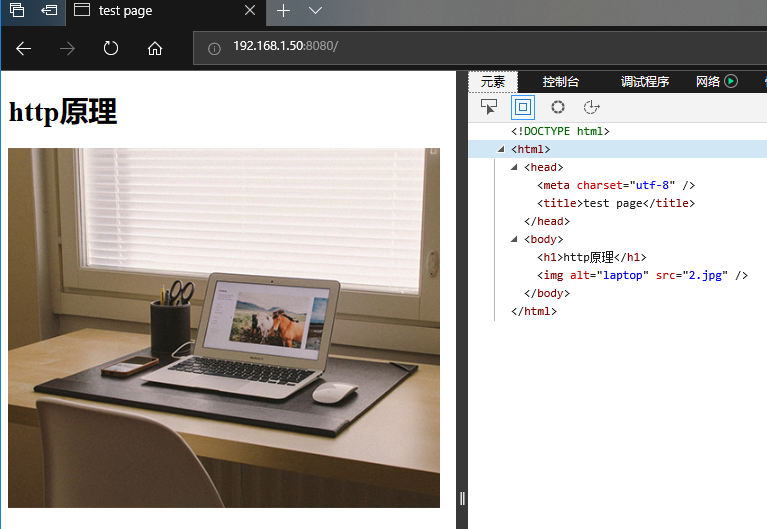
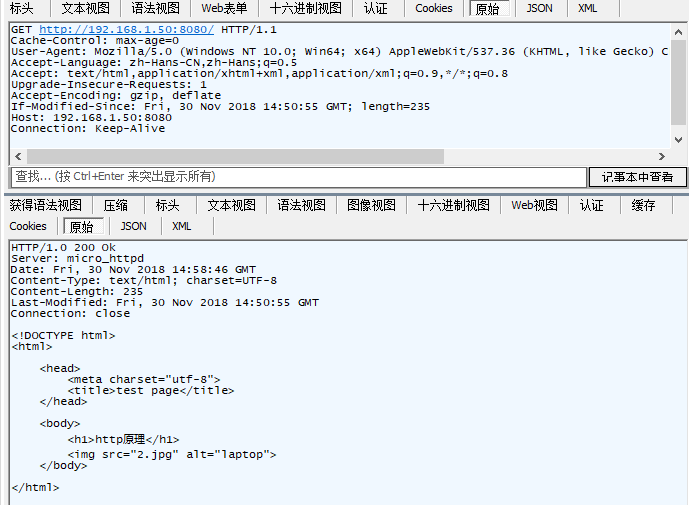
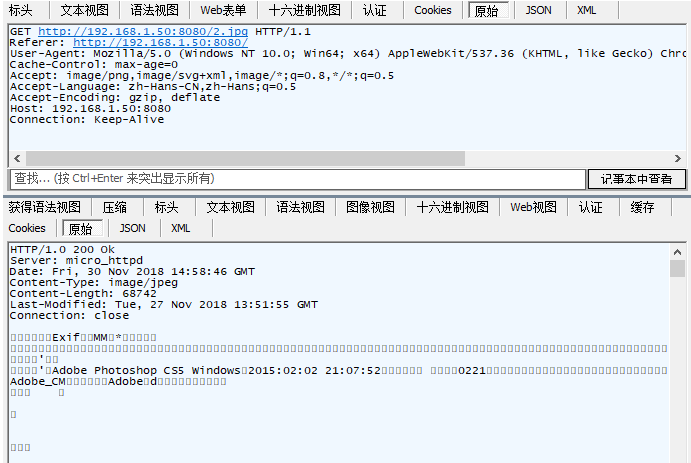
我们用Fiddle来看看传输的原始数据,由于网页中存在图片,所以浏览器一共向micro_httpd请求了两次数据,第一次为html文件,第二次为jpg文件

  • 请求index.html文件

  • 请求2.jpg文件

实验结果再一次证实我们对HTTP协议的理解是正确的。

安装micro_httpd

正确编译micro_httpd

1.进入linux系统下载源代码

2.解压后编译 make

3.得到可执行文件micro_httpd

4.新建一个目录(/home/user/www),随便写一个index.html,注意可读权限

5.运行程序 micro_httpd /home/user/www,回车

6.然后输入 GET / HTTP/1.0,两次回车

7.出现下面的的结果表示micro_httpd能够正常运行

1
2
3
4
5
6
7
HTTP/1.0 200 Ok
Server: micro_httpd
Date: Mon, 03 Dec 2018 07:22:50 GMT
Content-Type: text/html; charset=UTF-8
Content-Length: 1238
Last-Modified: Tue, 27 Nov 2018 12:31:52 GMT
Connection: close

将micro_httpd加入守护进程

micro_httpd自己不会监听端口,需要inetd守护进程监听,然后将请求转发给micro_httpd处理。

在Ubuntu中inetd已经被xinetd替换了。首先要安装xinetd,apt install xinetd,在/etc/xinetd.d中按照例子建立一个配置文件microhttpd(注意等号前后要有空格)

1
2
3
4
5
6
7
8
9
10
11
12
# daemon service for micro_httpd
service micro_httpd
{
socket_type = stream
protocol = tcp
port = 8080
wait = no
user = user
server = /home/user/micro_httpd/micro_httpd
server_args = /home/user/www/
disable = no
}

然后在/etc/services文件中加入micro_httpd的端口号

1
2
3
# micro_httpd
micro_httpd 8080/tcp
micro_httpd 8080/udp

重新加载xinted服务就可以在浏览器中查看网页了

1
2
sudo systemctl reload xinetd.service
systemctl status xinetd.service #查看是否有错误

扩展-xinetd守护进程

守护进程Daemon

根据Archlinux Wiki的描述,daemon是一种后台运行的服务进程,没有人机交互,一直在内存中等待某个事件的发生从而激活服务。最常见的就是网页服务器(web server)。Linux有三种基本的进程:interactive、batch、daemon。区别是

  • interactive 交互式进程,需要人员输入指令交互
  • batch 批量进程,后台运行,不需要人机交互,运行完后就推出
  • daemon 守护进程,后台运行,不需要人机交互,一直停留在内存中

daemon守护进程与Windows系统中的服务(services )是一样的概念。

xinetd

xinetd(extended Internet services daemon)是inetd的扩展版,在很多Linux上已经取代了inetd。根据Wiki的描述,xinetd守护进程是一个超级服务,能管理很多daemons和services,监听多路端口。xinetd通过端口号分发请求,即一个service对应一个端口号。服务与端口号的对应文件为/etc/services,xinetd的配置文件目录/etc/xinetd.conf。xinetd可以在配置instances属性限制同时运行的services数量。

更新另外一个简洁的http服务器

Tiny HTTPd增加了POST处理以及CGI处理,代码量也不大,500多行,主要函数:

1
2
3
4
5
6
7
8
9
10
11
12
void accept_request(int);
void bad_request(int);
void cat(int, FILE *);
void cannot_execute(int);
void error_die(const char *);
void execute_cgi(int, const char *, const char *, const char *);
int get_line(int, char *, int);
void headers(int, const char *);
void not_found(int);
void serve_file(int, const char *);
int startup(u_short *);
void unimplemented(int);
虽然很不要脸,但是还请您多多打赏 ^_^