搭建mqtt服务器broker

由于项目需要,对远程的电脑运行参数进行监控。之前接触过mqtt物联网协议,觉得用publish、subscribe的方式能够满足项目需求,并且部署简单,因此搭建了一台Mosquitto broker。默认的Mosquitto是不支持websockets的,为了使大家都能方便的监控数据,我采用了网页作为subscribe客户端,这样就要开启mosquitto的websockets功能。下面是主要搭建步骤:

服务器系统为:Ubuntu 18.04 x64

第一篇 搭建mqtt broker

1.安装依赖项

需要 openssl、libwebsockets

1
2
sudo apt install libssl-dev
sudo apt install libwebsockets-dev

2.下载并修改配置进行编译

在官网下载源码 wget https://mosquitto.org/files/source/mosquitto-1.6.0.tar.gz 或者去GitHub下载git clone https://github.com/eclipse/mosquitto.git

解压后修改config.mk文件,开启websockets

1
2
# Build with websockets support on the broker.
WITH_WEBSOCKETS:=yes

然后直接 make,make install

3.配置并开启服务

mosquitto支持多个端口,每个端口可以配置不同的协议,默认在1883端口监听mqtt访问。修改源文件中的mosquitto.conf文件

1
2
3
4
5
6
7
8
9
10
11
12
13
14
15
16
17
18
19
20
21
22
23
24
# ================
# Default listener
# ================
#在本段监听mqtt协议
# Port to use for the default listener.
port 1883
# Choose the protocol to use when listening.
# This can be either mqtt or websockets.
# Websockets support is currently disabled by default at compile time.
# Certificate based TLS may be used with websockets, except that
# only the cafile, certfile, keyfile and ciphers options are supported.
protocol mqtt

# =================
# Extra listeners
# =================
#在本段监听websockets协议
# listener port-number [ip address/host name]
listener 1884
# Choose the protocol to use when listening.
# This can be either mqtt or websockets.
# Certificate based TLS may be used with websockets, except that only the
# cafile, certfile, keyfile and ciphers options are supported.
protocol websockets

然后将mosquitto.conf文件放到某个路径(比如/etc/mosquitto.conf

启动mosquitto

1
mosquitto -c /etc/mosquitto.conf

至此一个简单的mqtt broker就建好了

第二篇 publish subscribe 测试

1.远程电脑端publish运行参数

为了轻巧,远程端采用c语言编写,用到paho的C库,主要过程如下,不停的向broker发送数据,当有subscriber时,broker就把数据转发给subscriber,类似于远端电脑向全网广播。

1
2
3
4
5
6
7
8
9
10
11
12
13
14
15
16
17
18
19
20
21
22
23
24
25
26
27
28
29
30
31
32
33
34
35
36
37
38
39
40
41
42
43
44
int _stdcall WinMain(HINSTANCE hInstance,HINSTANCE hPrevInstance,LPSTR lpCmdLine,int nCmdShow)
{
MQTTClient client;
MQTTClient_connectOptions conn_opts = MQTTClient_connectOptions_initializer;
MQTTClient_message pubmsg = MQTTClient_message_initializer;
MQTTClient_deliveryToken token;

while (true)
{
MQTTClient_create(&client, ADDRESS, CLIENTID,
MQTTCLIENT_PERSISTENCE_NONE, NULL);
conn_opts.keepAliveInterval = 20;
conn_opts.cleansession = 1;

while (MQTTClient_connect(client, &conn_opts) != MQTTCLIENT_SUCCESS)
{
printf("Failed to connect\n");
}
pubmsg.payload = PAYLOAD;
pubmsg.payloadlen = strlen(PAYLOAD);
pubmsg.qos = QOS;
pubmsg.retained = 0;

printf("publishing hello world....\n");
char msg[50] = "\0";
while (1)
{
MQTTClient_publishMessage(client, TOPIC, &pubmsg, &token);
if (MQTTCLIENT_SUCCESS != MQTTClient_waitForCompletion(client, token, TIMEOUT))
{
break;
}
Sleep(SLEEPTIME);
msg=GetPCLoad();
pubmsg.payload = msg;
pubmsg.payloadlen = strlen(msg);
}

MQTTClient_disconnect(client, 10000);
MQTTClient_destroy(&client);
}

return 0;
}

2.网页端subscribe

同样用到paho的js库,主要过程为

1
2
3
4
5
6
7
client = new Paho.MQTT.Client(host,port,path,Math.random().toString(16).substr(2));
client.connect({onSuccess:onConnect});
client.onMessageArrived = onMessageArrived;
function onMessageArrived(message) {
parse message;
plot data;
}

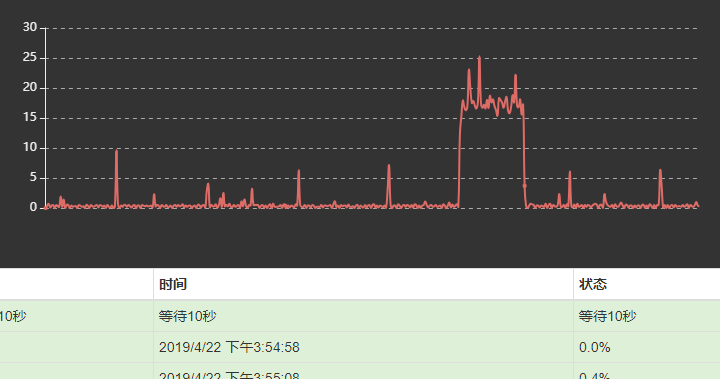
当数据到来时,用echart图表的方式实现可视化。效果如图

注意 IE浏览器不支持websocket,要用chrome内核的浏览器

虽然很不要脸,但是还请您多多打赏 ^_^