项目需要用RTP/RTSP做视频直播,为了对RTSP协议有个直观的认识,我利用Wirshark和Npcap对RTSP数据包进行抓包分析。
工具软件简介
驱动
WinPcap 和 Npcap都是工业级的网络抓包工具,网络抓包基本都会用到。
由于很长一段时间WinPcap没有更新了,于是Npcap在它的基础上被开发出来 (但是WinPcap最近又更新了)。目前来看,WinPcap不能抓取本地回环地址(Loopback Address),即 127.0.0.1,Npcap可以。
前端
Wireshark是非常好用的网络协议分析软件,它可以把Npcap抓取到的数据包按照各种协议解析,可视化非常棒。
操作过程
建立rtsp服务器
我用了两种方式:
- 使用Live555服务器。 “LIVE555 Media Server”是一个开源的RTSP服务器,使用很简单。单文件程序,将视频文件和程序放到同一个文件夹,运行程序就可以通过rtsp协议访问了,例如:rtsp://192.168.1.3:8554/demo.mp4。这种方式可以在同一个局域网中访问。
- 使用VLC播放器的流服务。 具体为选择 【媒体->流-> 添加文件-> 串流-> 添加RTSP-> 修改端口路径-> 完善sdp地址】,最后得到一串这样的字符
:sout=#rtp{sdp=rtsp://localhost:8554/demo} :no-sout-all :sout-keep。这种方式由于防火墙的限制,只能在本机使用。
抓取数据包
使用VLC流服务建立的rtsp服务器的方式。 VLC串流开始后,在打开一个VLC播放器,打开网络串流rtsp://localhost:8554/ 就会看到视频了。但注意,由于是本地回环地址抓包,因此Wireshark选择
Npcap Loopback Adapter网卡输入(安装完Npcap会生成这个网卡)
这里只介绍使用 LIVE555 Media Server 的方式。打开Wireshark,选择电脑网卡,进入主界面会看到好多ip数据包,我们需要挑选出有用的。在过滤输入框内输入ip.addr==192.168.1.3(192.168.1.3是rtsp服务器的ip),这样就只会显示来自rtsp服务器的数据包。
然后用VLC打开网络串流rtsp://192.168.1.3:8554/demo.mp4,就会抓取到rtsp数据包了。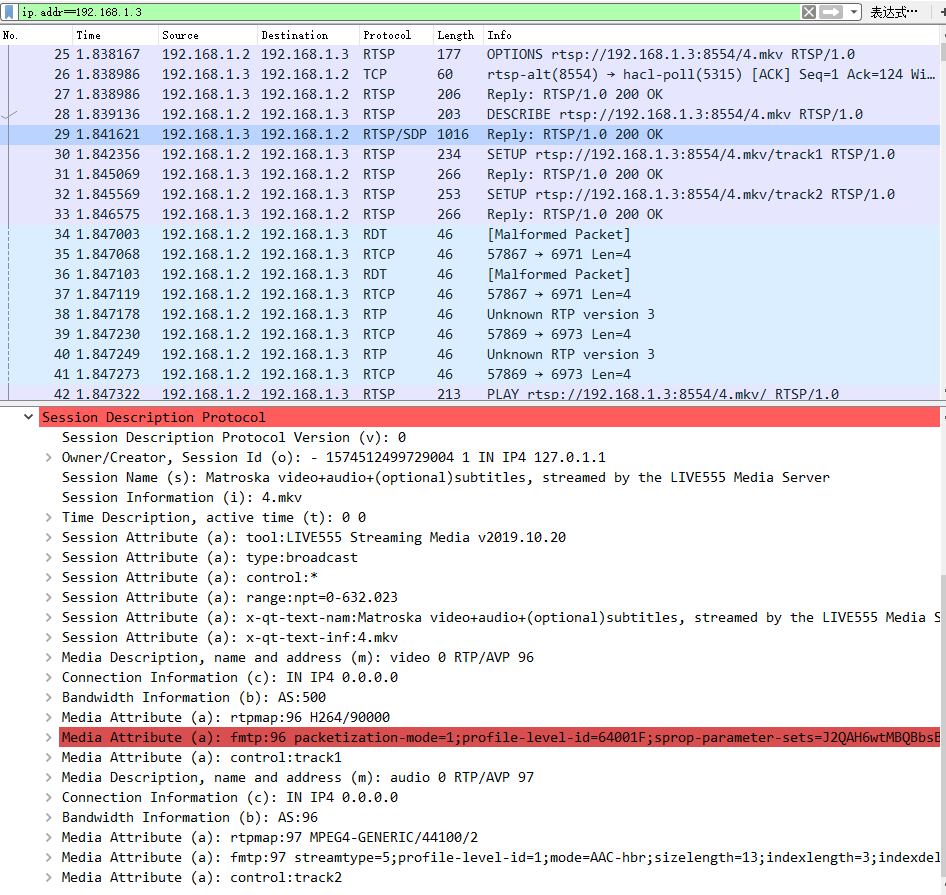
可以看到,开始建立链接的过程中,类似tcp三次握手的方式,相互确认。其中有一个步骤是服务器向客户端发送sdp描述文件RTSP/SDP协议。查看具体信息会发现有Media Description, name and address (m): video 0 RTP/AVP 96 和 Media Description, name and address (m): audio 0 RTP/AVP 97 分别表示视频流为负载96,音频流为负载97。这和RTP的SDP文件是一样的。也就说明了,RTSP协议会自动发送SDP文件,不用再去手动写一份SDP文件然后用VLC打开。
再往下看,会看到传输的数据,有两种负载类型96和97,从SDP描述信息已经知道96为视频流,所以可以把RTP包进一步解包,然后用H264解码;97为音频流,由于没有找到音频的解码协议,因此没有对RTP包进一步解码。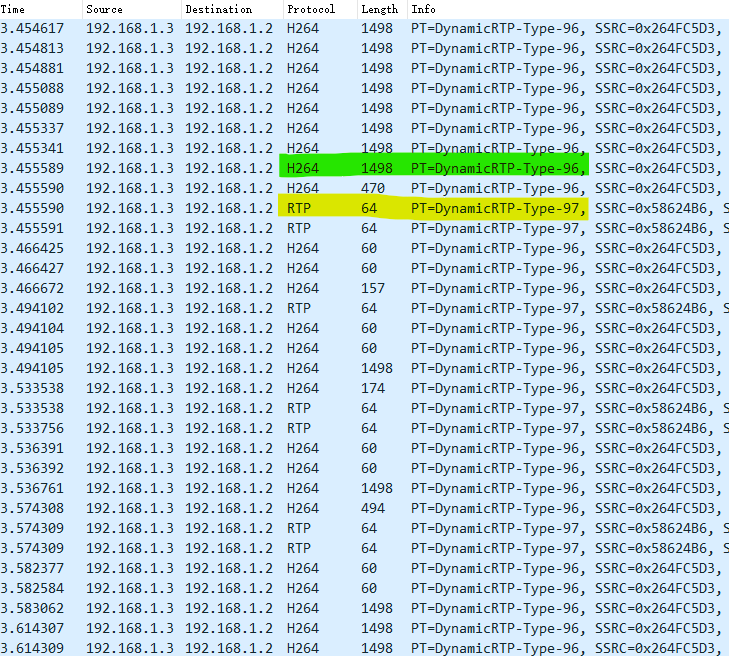
如果没有看到如上的结果,而是显示的是UDP协议,需要对UDP进一步解码,选中一个UDP包,右键选择解码为RTP即可。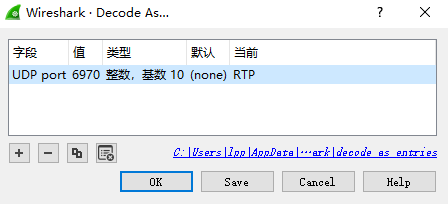
从上面的结果可以看出,RTSP是靠RTSP/SDP传输SDP描述文件,靠RTP协议传输音视频数据,靠RTCP进行控制。
扩展 RTP MPEG_TS 包
RTP服务器一般是直接把h264数据或ac3数据发送出去,客户端根据负载类型对数据进行解码。一般直播会选择这种方式,实时性好。
RTP还有另一种方式发送数据,就是把音频和视频封装到TS容器,然后再发送mpeg ts包。这样实际就是发送的一个完整的视频文件了,只是时间只有几秒而已。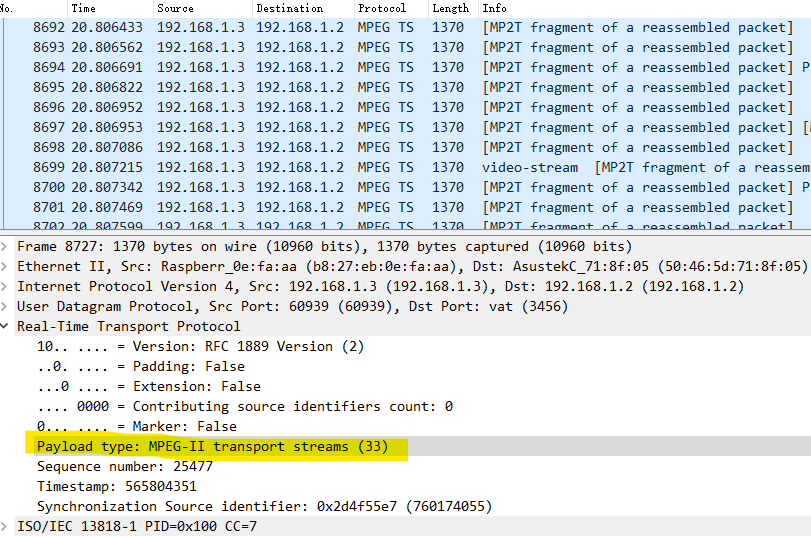
可以把其保存到本地视频文件。保存为本地视频文件具体操作可参考wireshark wiki
Wireshark extension to dump MPEG2 transport stream packets to file, removing the network headers and leaving just an MPEG2 transport stream. To use this script:
- Download the attachment mpeg_packets_dump.lua
- Save it in the Wireshark home directory e.g. c:\Program Files\Wireshark — as “mpeg_packets_dump.lua”
- Edit init.lua in the Wireshark home directory and add the following line: dofile(“mpeg_packets_dump.lua”)
- Restart Wireshark to add the extension
- Capture some traffic which includes some MPEG transport packets, for example, it has been tested with MPEG transmitted via UDP multicast.
- Stop the capture, and select Tools -> Dump MPEG TS Packets
- Enter the file where the mpeg stream should be saved.
- In order to select only one of many streams, enter a wireshark filter — expression, or you can leave the filter blank.
- Press okay. Any MPEG packets in the current capture which were detected by the MPEG dissector and that match your filter will be dumped to your output file
RTP MPEG_TS的方式是不需要SDP描述文件的,SDP描述文件的目的是告诉客户端对哪种类型的负载采用哪种解码方式。看看RTP报头可以发现
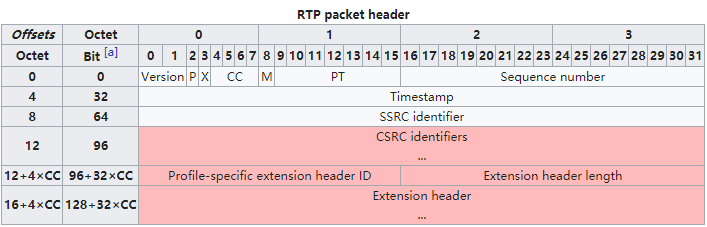
RTP协议用一个7bit数据表示负载类型,因此一共可以表示128种。具体可看RTP_payload_formats wiki
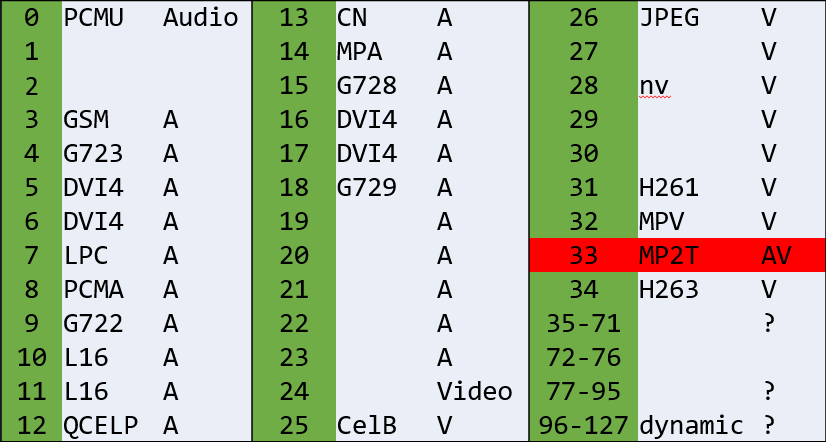
可以看到有一些类型是固定的。正如上图显示的负载类型为33,就表示这个RTP包的内容为封装为TS的音视频数据,客户端就可以按照mpeg ts解码了。如果使用的是96以上的负载类型,就需要写一个sdp文件告诉客户端怎么解码了。
ffmpeg命令行
1 | 提取视频: |
wireshark插件
在抓包RTP过程中,常常需要把视频数据保存到本地,我使用到了两个非常好用的插件,可以满足一般需求。分别是 h264_export.lua 和 mpeg_packets_dump.lua 。
安装方式,进入wireshark根目录,找到init.lua文件,在最后面添加两行dofile("mpeg_packets_dump.lua") dofile("h264_export.lua") ,然后把h264_export.lua 和 mpeg_packets_dump.lua文件放到根目录下即可。重启软件就能加载插件了。
h264_export.lua 把H264包保存为本地 .h264视频文件[项目地址] (https://github.com/seudut/h264_export)
1
2
3
4
5
6
7
8
9
10
11
12
13
14
15
16
17
18
19
20
21
22
23
24
25
26
27
28
29
30
31
32
33
34
35
36
37
38
39
40
41
42
43
44
45
46
47
48
49
50
51
52
53
54
55
56
57
58
59
60
61
62
63
64
65
66
67
68
69
70
71
72
73
74
75
76
77
78
79
80
81
82
83
84
85
86
87
88
89
90
91
92
93
94
95
96
97
98
99
100
101
102
103
104
105
106
107
108
109
110
111
112
113
114
115
116
117
118
119
120
121
122
123
124
125
126
127
128
129
130
131
132
133
134
135
136
137
138
139
140
141
142
143
144
145
146
147
148
149
150
151
152
153
154
155
156
157
158
159
160
161
162
163
164
165
166
167
168
169
170
171
172
173
174
175
176
177
178
179
180
181
182
183
184
185
186
187
188
189
190
191
192
193
194
195
196
197
198
199
200
201
202
203
204
205
206
207
208
209
210
211
212
213
214
215
216
217
218
219
220
221
222
223
224
225
226
227
228
229
230
231
232
233
234
235
236
237
238
239
240
241
242
243
244
245
246
247
248
249
250
251
252
253
254
255
256
257
258
259
260
261
262
263
264
265
266
267
268
269
270
271
272
273
274
275
276
277
278
279
280
281
282
283
284
285
286
287
288
289
290
291
292
293
294
295
296
297
298
299
300
301
302
303
304
305
306
307
308
309
310
311
312
313
314
315
316
317
318
319
320
321
322
323
324
325
326
327
328
329
330
331
332
333
334
335
336
337
338
339
340
341
342
343
344
345
346
347
348
349
350
351
352
353
354
355
356
357
358
359
360
361
362
363
364
365
366
367
368
369
370
371
372
373
374
375
376
377
378
379
380
381
382
383
384
385
386
387
388
389
390
391
392
393
394
395
396
397
398
399
400
401
402
403
404
405
406
407
408
409
410
411
412
413
414
415
416
417
418
419
420
421
422
423
424
425
426
427
428
429
430
431
432
433
434
435
436
437
438
439
440
441
442
443
444
445
446
447
448
449
450
451
452
453
454
455
456
457
458
459
460-- Dump RTP h.264 payload to raw h.264 file (*.264)
-- According to RFC3984 to dissector H264 payload of RTP to NALU, and write it
-- to from<sourceIp_sourcePort>to<dstIp_dstPort>.264 file. By now, we support single NALU,
-- STAP-A and FU-A format RTP payload for H.264.
-- You can access this feature by menu "Tools->Export H264 to file [HQX's plugins]"
-- Author: Huang Qiangxiong (qiangxiong.huang@gmail.com)
-- change log:
-- 2012-03-13
-- Just can play
-- 2012-04-28
-- Add local to local function, and add [local bit = require("bit")] to prevent
-- bit recleared in previous file.
-- 2013-07-11
-- Add sort RTP and drop uncompleted frame option.
-- 2013-07-19
-- Do nothing when tap is triggered other than button event.
-- Add check for first or last packs lost of one frame.
-- 2014-10-23
-- Fixed bug about print a frame.nalu_type error.
-- 2014-11-07
-- Add support for Lua 5.2(>1.10.1) and 5.1(<=1.10.1).
-- Change range:string() to range:raw().
-- Change h264_f.value to h264_f.range:bytes() because of wireshark lua bug.
-- 2015-06-03
-- Fixed bug that if ipv6 address is using the file will not generated.(we replace ':' to '.')
-- 2017-08-18
-- Fixed bug on Mac with Wireshark 2.4.1, that error (Permission denied) happens when writing to file.
-- Add check when open file, if failed, trying home directory instead of default directory
-- (/Application/Wireshark.app/)
------------------------------------------------------------------------------------------------
do
--local bit = require("bit") -- only work before 1.10.1
--local bit = require("bit32") -- only work after 1.10.1 (only support in Lua 5.2)
local version_str = string.match(_VERSION, "%d+[.]%d*")
local version_num = version_str and tonumber(version_str) or 5.1
local bit = (version_num >= 5.2) and require("bit32") or require("bit")
-- for geting h264 data (the field's value is type of ByteArray)
local f_h264 = Field.new("h264")
local f_rtp = Field.new("rtp")
local f_rtp_seq = Field.new("rtp.seq")
local f_rtp_timestamp = Field.new("rtp.timestamp")
local nalu_type_list = {
[0] = "Unspecified",
[1] = "P/B_slice",
[2] = "P/B_A",
[3] = "P/B_B",
[4] = "P/B_C",
[5] = "I_slice",
[6] = "SEI",
[7] = "SPS",
[8] = "PPS",
[9] = "AUD",
}
local function get_enum_name(list, index)
local value = list[index]
return value and value or "Unknown"
end
-- menu action. When you click "Tools->Export H264 to file [HQX's plugins]" will run this function
local function export_h264_to_file()
-- window for showing information
local tw = TextWindow.new("Export H264 to File Info Win")
--local pgtw = ProgDlg.new("Export H264 to File Process", "Dumping H264 data to file...")
local pgtw;
-- add message to information window
function twappend(str)
tw:append(str)
tw:append("\n")
end
-- running first time for counting and finding sps+pps, second time for real saving
local first_run = true
-- variable for storing rtp stream and dumping parameters
local stream_infos = nil
-- drop_uncompleted_frame
local drop_uncompleted_frame = false
-- max frame buffer size
local MAX_FRAME_NUM = 3
-- trigered by all h264 packats
local my_h264_tap = Listener.new(tap, "h264")
-- get rtp stream info by src and dst address
function get_stream_info(pinfo)
local key = "from_" .. tostring(pinfo.src) .. "_" .. tostring(pinfo.src_port) .. "to" .. tostring(pinfo.dst) .. "_" .. tostring(pinfo.dst_port) .. (drop_uncompleted_frame and "_dropped" or "_all")
key = key:gsub(":", ".")
local stream_info = stream_infos[key]
if not stream_info then -- if not exists, create one
stream_info = { }
stream_info.filename = key.. ".264"
stream_info.file, err= io.open(stream_info.filename, "wb")
if stream_info.file == nil then
twappend("*** Error - Could not open file: " .. err .. "\n")
twappend("Trying the home directory... \n")
stream_info.file, err= io.open( os.getenv("HOME") .. "/" .. stream_info.filename, "wb")
if stream_info.file == nil then
twappend("*** Error - :" .. err .. " \n")
else
twappend("*** Success - Open file : " .. os.getenv("HOME") .. "/" .. stream_info.filename .. " \n")
end
end
stream_info.counter = 0 -- counting h264 total NALUs
stream_info.counter2 = 0 -- for second time running
stream_infos[key] = stream_info
twappend("Ready to export H.264 data (RTP from " .. tostring(pinfo.src) .. ":" .. tostring(pinfo.src_port)
.. " to " .. tostring(pinfo.dst) .. ":" .. tostring(pinfo.dst_port) .. " to file:\n [" .. stream_info.filename .. "] ...\n")
end
return stream_info
end
-- write a NALU or part of NALU to file.
local function real_write_to_file(stream_info, str_bytes, begin_with_nalu_hdr)
if first_run then
stream_info.counter = stream_info.counter + 1
if begin_with_nalu_hdr then
-- save SPS or PPS
local nalu_type = bit.band(str_bytes:byte(0,1), 0x1F)
if not stream_info.sps and nalu_type == 7 then
stream_info.sps = str_bytes
elseif not stream_info.pps and nalu_type == 8 then
stream_info.pps = str_bytes
end
end
else -- second time running
--[[
if begin_with_nalu_hdr then
-- drop AUD
local nalu_type = bit.band(str_bytes:byte(0,1), 0x1F)
if nalu_type == 9 then
return;
end
end
]]
if stream_info.counter2 == 0 then
-- write SPS and PPS to file header first
if stream_info.sps then
stream_info.file:write("\00\00\00\01")
stream_info.file:write(stream_info.sps)
else
twappend("Not found SPS for [" .. stream_info.filename .. "], it might not be played!\n")
end
if stream_info.pps then
stream_info.file:write("\00\00\00\01")
stream_info.file:write(stream_info.pps)
else
twappend("Not found PPS for [" .. stream_info.filename .. "], it might not be played!\n")
end
end
if begin_with_nalu_hdr then
-- *.264 raw file format seams that every nalu start with 0x00000001
stream_info.file:write("\00\00\00\01")
end
stream_info.file:write(str_bytes)
stream_info.counter2 = stream_info.counter2 + 1
-- update progress window's progress bar
if stream_info.counter > 0 and stream_info.counter2 < stream_info.counter then pgtw:update(stream_info.counter2 / stream_info.counter) end
end
end
local function comp_pack(p1, p2)
if math.abs(p2.seq - p1.seq) < 1000 then
return p1.seq < p2.seq
else -- seqeunce is over 2^16, so the small one is much big
return p1.seq > p2.seq
end
end
local function print_seq_error(stream_info, str)
if stream_info.seq_error_counter == nil then
stream_info.seq_error_counter = 0
end
stream_info.seq_error_counter = stream_info.seq_error_counter + 1
twappend(str .. " SeqErrCounts=" .. stream_info.seq_error_counter)
end
local function sort_and_write(stream_info, frame)
table.sort(frame.packs, comp_pack)
-- check if it is uncompleted frame
local completed = true
for i = 1, #frame.packs - 1, 1 do
local seq1 = frame.packs[i].seq
local seq2 = frame.packs[i+1].seq
if bit.band(seq1+1, 0xFFFF) ~= seq2 then
print_seq_error(stream_info, " RTP pack Lost: timestamp=" .. frame.timestamp .. " seq between " .. seq1 .. " and " .. seq2)
completed = false
end
end
if not frame.packs[1].nalu_begin then
print_seq_error(stream_info, " RTP pack Lost: timestamp=" .. frame.timestamp .. " seq before " .. frame.packs[1].seq)
completed = false
end
if not frame.packs[#frame.packs].nalu_end then
print_seq_error(stream_info, " RTP pack Lost: timestamp=" .. frame.timestamp .. " seq after " .. frame.packs[#frame.packs].seq)
completed = false
end
if completed then
for i = 1, #frame.packs, 1 do
real_write_to_file(stream_info, frame.packs[i].data, frame.packs[i].nalu_begin)
end
else
twappend(" We drop one uncompleted frame: rtp.timestamp=" .. frame.timestamp
.. " nalu_type=" .. (frame.nalu_type and frame.nalu_type .."(" .. get_enum_name(nalu_type_list, frame.nalu_type) .. ")" or "unknown") )
end
end
local function write_to_file(stream_info, str_bytes, begin_with_nalu_hdr, timestamp, seq, end_of_nalu)
if drop_uncompleted_frame and not first_run then -- sort and drop uncompleted frame
if stream_info.frame_buffer_size == nil then
stream_info.frame_buffer_size = 0
end
if timestamp < 0 or seq < 0 then
twappend(" Invalid rtp timestamp (".. timestamp .. ") or seq (".. seq .. ")! We have to write it to file directly!")
real_write_to_file(stream_info, str_bytes, begin_with_nalu_hdr)
return;
end
-- check if this frame has existed
local p = stream_info.frame_buffer
while p do
if p.timestamp == timestamp then
break;
else
p = p.next
end
end
if p then -- add this pack to frame
if begin_with_nalu_hdr then
p.nalu_type = bit.band(str_bytes:byte(1), 0x1F)
end
table.insert(p.packs, { ["seq"] = seq, ["data"] = str_bytes , ["nalu_begin"] = begin_with_nalu_hdr, ["nalu_end"] = end_of_nalu })
return
end
if stream_info.frame_buffer_size >= MAX_FRAME_NUM then
-- write the most early frame to file
sort_and_write(stream_info, stream_info.frame_buffer)
stream_info.frame_buffer = stream_info.frame_buffer.next
stream_info.frame_buffer_size = stream_info.frame_buffer_size - 1
end
-- create a new frame buffer for new frame (timestamp)
local frame = {}
frame.timestamp = timestamp
if begin_with_nalu_hdr then
frame.nalu_type = bit.band(str_bytes:byte(1), 0x1F)
end
frame.packs = {{ ["seq"] = seq, ["data"] = str_bytes, ["nalu_begin"] = begin_with_nalu_hdr, ["nalu_end"] = end_of_nalu}} -- put pack to index 1 pos
frame.next = nil
if stream_info.frame_buffer_size == 0 then -- first frame
stream_info.frame_buffer = frame
else
p = stream_info.frame_buffer
while p.next do
p = p.next
end
p.next = frame
end
stream_info.frame_buffer_size = stream_info.frame_buffer_size + 1
else -- write data direct to file without sort or frame drop
real_write_to_file(stream_info, str_bytes, begin_with_nalu_hdr)
end
end
-- read RFC3984 about single nalu/stap-a/fu-a H264 payload format of rtp
-- single NALU: one rtp payload contains only NALU
local function process_single_nalu(stream_info, h264, timestamp, seq)
--write_to_file(stream_info, h264:tvb()():string(), true, timestamp, seq, true)
write_to_file(stream_info, ((version_num >= 5.2) and h264:tvb():raw() or h264:tvb()():string()), true, timestamp, seq, true)
end
-- STAP-A: one rtp payload contains more than one NALUs
local function process_stap_a(stream_info, h264, timestamp, seq)
local h264tvb = h264:tvb()
local offset = 1
local i = 1
repeat
local size = h264tvb(offset,2):uint()
--write_to_file(stream_info, h264tvb(offset+2, size):string(), true, timestamp, i, true)
write_to_file(stream_info, ((version_num >= 5.2) and h264tvb:raw(offset+2, size) or h264tvb(offset+2, size):string()), true, timestamp, i, true)
offset = offset + 2 + size
i = i + 1
until offset >= h264tvb:len()
end
-- FU-A: one rtp payload contains only one part of a NALU (might be begin, middle and end part of a NALU)
local function process_fu_a(stream_info, h264, timestamp, seq)
local h264tvb = h264:tvb()
local fu_idr = h264:get_index(0)
local fu_hdr = h264:get_index(1)
local end_of_nalu = (bit.band(fu_hdr, 0x40) ~= 0)
if bit.band(fu_hdr, 0x80) ~= 0 then
-- start bit is set then save nalu header and body
local nalu_hdr = bit.bor(bit.band(fu_idr, 0xE0), bit.band(fu_hdr, 0x1F))
--write_to_file(stream_info, string.char(nalu_hdr) .. h264tvb(2):string(), true, timestamp, seq, end_of_nalu)
write_to_file(stream_info, string.char(nalu_hdr) .. ((version_num >= 5.2) and h264tvb:raw(2) or h264tvb(2):string()), true, timestamp, seq, end_of_nalu)
else
-- start bit not set, just write part of nalu body
--write_to_file(stream_info, h264tvb(2):string(), false, timestamp, seq, end_of_nalu)
write_to_file(stream_info, ((version_num >= 5.2) and h264tvb:raw(2) or h264tvb(2):string()), false, timestamp, seq, end_of_nalu)
end
end
-- call this function if a packet contains h264 payload
function my_h264_tap.packet(pinfo,tvb)
if stream_infos == nil then
-- not triggered by button event, so do nothing.
return
end
local h264s = { f_h264() } -- using table because one packet may contains more than one RTP
local rtps = { f_rtp() }
local rtp_seqs = { f_rtp_seq() }
local rtp_timestamps = { f_rtp_timestamp() }
for i,h264_f in ipairs(h264s) do
if h264_f.len < 2 then
return
end
--local h264 = h264_f.value -- is ByteArray, it only works for 1.10.1 or early version
--local h264 = h264_f.range:bytes() -- according to user-guide.chm, there is a bug of fieldInfo.value, so we have to convert it to TVB range first
local h264 = (version_num >= 5.2) and h264_f.range:bytes() or h264_f.value
local hdr_type = bit.band(h264:get_index(0), 0x1F)
local stream_info = get_stream_info(pinfo)
--twappend(string.format("hdr_type=%X %d", hdr_type, hdr_type))
--twappend("bytearray=" .. tostring(h264))
--twappend("byterange=" .. tostring(h264_f.range):upper())
-- search the RTP timestamp and sequence of this H264
local timestamp = -1
local seq = -1
-- debug begin
local rtplen = -1
local preh264_foffset = -1
local prertp_foffset = -1
local preh264len = -1
-- debug end
if drop_uncompleted_frame then
local matchx = 0;
for j,rtp_f in ipairs(rtps) do
if h264_f.offset > rtp_f.offset and h264_f.offset - rtp_f.offset <= 16 and h264_f.offset+h264_f.len <= rtp_f.offset+rtp_f.len then
-- debug begin
--if h264_f.offset > rtp_f.offset and h264_f.offset < rtp_f.offset+rtp_f.len then
matchx = matchx + 1
if matchx > 1 then
print_seq_error(stream_info, "ASS seq=" .. seq .. " timestamp=" .. timestamp .. " rtplen=" .. rtplen .. " rtpoff=" .. prertp_foffset .. " h264off=" .. preh264_foffset .. " h264len=" .. preh264len .. " |matched=" .. matchx .. " New seq=" .. rtp_seqs[j].value .. " timestamp=" .. rtp_timestamps[j].value .. " rtplen=" .. rtp_f.len .." rtpoff=" .. rtp_f.offset .. " h264off=" .. h264_f.offset .. " h264.len=" .. h264_f.len)
end
-- debug end
seq = rtp_seqs[j].value
timestamp = rtp_timestamps[j].value
-- debug begin
rtplen = rtp_f.len
preh264_foffset = h264_f.offset
prertp_foffset = rtp_f.offset
preh264len = h264_f.len
-- debug end
break
end
end
end
if hdr_type > 0 and hdr_type < 24 then
-- Single NALU
process_single_nalu(stream_info, h264, timestamp, seq)
elseif hdr_type == 24 then
-- STAP-A Single-time aggregation
process_stap_a(stream_info, h264, timestamp, seq)
elseif hdr_type == 28 then
-- FU-A
process_fu_a(stream_info, h264, timestamp, seq)
else
twappend("Error: unknown type=" .. hdr_type .. " ; we only know 1-23(Single NALU),24(STAP-A),28(FU-A)!")
end
end
end
-- close all open files
local function close_all_files()
if stream_infos then
local no_streams = true
for id,stream in pairs(stream_infos) do
if stream and stream.file then
if stream.frame_buffer then
local p = stream.frame_buffer
while p do
sort_and_write(stream, p)
p = p.next
end
stream.frame_buffer = nil
stream.frame_buffer_size = 0
end
stream.file:flush()
stream.file:close()
twappend("File [" .. stream.filename .. "] generated OK!\n")
stream.file = nil
no_streams = false
end
end
if no_streams then
twappend("Not found any H.264 over RTP streams!")
end
end
end
function my_h264_tap.reset()
-- do nothing now
end
local function remove()
my_h264_tap:remove()
end
tw:set_atclose(remove)
local function export_h264(drop_frame)
pgtw = ProgDlg.new("Export H264 to File Process", "Dumping H264 data to file...")
first_run = true
drop_uncompleted_frame = drop_frame
stream_infos = {}
-- first time it runs for counting h.264 packets and finding SPS and PPS
retap_packets()
first_run = false
-- second time it runs for saving h264 data to target file.
retap_packets()
close_all_files()
-- close progress window
pgtw:close()
stream_infos = nil
end
local function export_all()
export_h264(false)
end
local function export_completed_frames()
export_h264(true)
end
tw:add_button("Export All", export_all)
tw:add_button("Export Completed Frames (Drop uncompleted frames)", export_completed_frames)
end
-- Find this feature in menu "Tools->"Export H264 to file [HQX's plugins]""
register_menu("Export H264 to file [HQX's plugins]", export_h264_to_file, MENU_TOOLS_UNSORTED)
endmpeg_packets_dump.lua 将mpeg ts包保存为ts视频文件
1
2
3
4
5
6
7
8
9
10
11
12
13
14
15
16
17
18
19
20
21
22
23
24
25
26
27
28
29
30
31
32
33
34
35
36
37
38
39
40
41
42
43
44
45
46
47
48
49
50
51
52
53
54
55
56
57
58
59
60
61
62
63
64
65
66
67
68
69
70
71
72
73
74
75
76
77
78
79
80
81
82
83
84
85
86
87
88
89
90
91
92
93
94
95
96
97
98
99
100
101
102
103
104
105
106
107
-- Wireshark extension to dump MPEG2 transport stream packets
--
-- To use this script:
-- 1. Save it in the Wireshark home directory e.g. c:\Program Files\Wireshark
-- 2. Edit init.lua in the Wireshark home directory and add the following line
--    dofile("mpeg_packets_dump.lua")
-- 3. Restart Wireshark to add the extension
-- 4. Capture some traffic which includes some MPEG transport packets, for
--    example, it has been tested with MPEG transmitted via UDP multicast.
-- 5. Stop the capture, and select Tools -> Dump MPEG TS Packets
-- 6. Enter the file where the mpeg stream should be saved.
-- 7. In order to select only one of many streams, enter a wireshark filter
--    expression, or you can leave the filter blank.
-- 8. Press okay. Any MPEG packets in the current capture which were detected
--    by the MPEG dissector and that match your filter will be dumped to
--    your output file.
--
-- Tested with Wireshark 1.4.3
-- ryan.gorsuch_at_echostar_com
-- 2011-04-01
-- Modified and tested with Wireshark 1.11.3
-- hadrielk_at_yahoo_com
-- 2014-02-17

-- only works in wireshark, not tshark
if not GUI_ENABLED then
	print("mpeg_packets_dump.lua only works in Wireshark")
	return
end

-- declare some field extractors
local mpeg_pid     = Field.new("mp2t.pid")
local mpeg_pkt     = Field.new("mp2t")

-- declare some functions we define later
local tobinary

-- do a payload dump when prompted by the user
local function init_payload_dump(file,filter)

	local packet_count = 0
	local tap = Listener.new(nil,filter)
	local myfile = assert(io.open(file, "w+b"))

	-- this function is going to be called once each time our filter matches
	function tap.packet(pinfo,tvb)

		if ( mpeg_pid() ) then
			packet_count = packet_count + 1

			-- there can be multiple mp2t packets in a given frame, so get them all into a table
			local contents = { mpeg_pkt() }

			for i,finfo in ipairs(contents) do
				local tvbrange = finfo.range
				myfile:write( tobinary( tostring( tvbrange:bytes() ) ) )
				myfile:flush()
			end
		end
	end

	-- re-inspect all the packets that are in the current capture, thereby
	-- triggering the above tap.packet function
	retap_packets()

	-- cleanup
	myfile:close()
	tap:remove()
	debug("Dumped mpeg packets: " .. packet_count )
end

-- show this dialog when the user select "Dump" from the Tools menu
local function begin_dialog_menu()
	new_dialog("Dump MPEG TS Packets",init_payload_dump,"Output file","Packet filter (optional)\n\nExamples:\nip.dst == 225.1.1.4\nmp2t\nmp2t.pid == 0x300")
end

register_menu("Dump MPEG TS Packets",begin_dialog_menu,MENU_TOOLS_UNSORTED)


local function hex(ascii_code)
	-- convert an ascii char code to an integer value "0" => 0, "1" => 1, etc
	if not ascii_code then
		return 0
	elseif ascii_code < 58 then
		return ascii_code - 48
	elseif ascii_code < 91 then
		return ascii_code - 65 + 10
	else
		return ascii_code - 97 + 10
	end
end

tobinary = function (hexbytes)
-- this function converts a hex-string to raw bytes

	local binary = {}
	local sz = 1

	for i=1, string.len(hexbytes), 2 do
		binary[sz] = string.char( 16 * hex( string.byte(hexbytes,i) ) + hex( string.byte(hexbytes,i+1) ) )
		sz = sz + 1
	end

	return table.concat(binary)

end